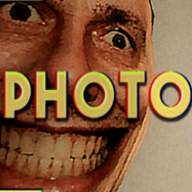
What are anomalies in Photomaly?
Abnormal events in and around your studio, plus figures and details that appear in developed photos. From the day the shop cameras are installed, finding and reporting them is a paid task with a daily target.

Sponsored
Photomaly anomalies are the abnormal events that appear around your studio and inside the photos you develop — and from the moment a contact installs security cameras in the shop, spotting them becomes a job with a daily quota. Basic loop first? Start on the beginner guide. Verified August 16, 2026.
Photomaly never stops being a job sim — the horror arrives as things that do not belong in a working photo studio. Some of it stands in your rooms; some of it only exists in a developed print.
| Surface | What to watch for | How you log it |
|---|---|---|
| The studio and back rooms | Objects, figures or props that appear where nothing was — a piñata hung in a room, something in the vents, a shape under the bed | Walk there with the camera and photograph it |
| Security camera feeds | A room on camera that no longer matches the room you remember | Go to that room, then photograph the source |
| Developed photos and prints | A person or detail in the print who was never in front of the lens | Compare the print to what you shot — see film developing |
| Customers | Requests and behaviour that stop being ordinary business | Serve them normally; details on customers |
| The shop computer | Files, screens and tools that stop behaving — including someone else touching your machine | Report what you can photograph, not what you assume |
Photography is how the game turns a feeling into evidence. A shape you half-saw in the lobby is worth nothing to your contact; the same shape in a photo transferred to the computer is a report. That is also why the horror escalates the way it does — you are being asked to walk toward the thing instead of away from it.
Before the reporting workflow makes sense, you need to know when anomalies actually spawn.
The shop cameras are software on your counter computer: a small viewer with labelled feeds such as the lobby camera, cycled with the arrow buttons. Sweeping them is a five-second habit you repeat all day rather than a task you sit down for.

The reliable pattern is customer-driven: a new anomaly generally turns up when a new customer arrives, or when that customer steps into the room to have their photo taken. Two sweeps per customer therefore cover most of a day, which is far more efficient than checking the feeds on a whim and finding four changes at once.
The feed goes staticky when it switches between cameras. Noises during a shift are frequently deliveries arriving, a fan, or a cat that is genuinely a cat. Learning the shop's ordinary noise profile in the first day or two is what stops you burning shift time chasing nothing.
Once you know where the abnormal thing is, the report itself has rules.
Reporting is a four-step chain, and it always ends at the computer. Your contact is explicit about it: check the cameras during the shift, go to whatever looks abnormal, photograph it, transfer it to the PC, and report it.

| Step | What you do | What can go wrong |
|---|---|---|
| 1 · Spot | Find the change on a camera feed or in person | Chasing camera static or ordinary shop noise |
| 2 · Approach | Walk to the room and get a clean line of sight | Framing from too far away or through a doorway |
| 3 · Photograph | Shoot the anomaly with the camera in hand | A shot too vague to be accepted as evidence |
| 4 · Report | Transfer to the computer, open the photo, choose Report | Printing or deleting the shot instead of reporting it |
Not every shot is accepted. If the subject is small, half-hidden or shot from across a room, expect to reposition — behind a door, closer in, or from an angle where the anomaly fills more of the frame — and take the picture again. A confirmed report is acknowledged in plain language, so you always know whether the evidence landed.

The order you accepted does not pause while you play investigator. Format, print size and print count stay on screen while the camera is in your hands, which is a deliberate nudge: hand over the envelope that is already dry, then go hunting. Customers who wait too long are lost business, and the studio's money still buys your Paper, Ink and Envelopes.
The reason to be this disciplined is the quota — and it does not stay the same size.
Matched by build plan, shared topics, and guide progression — not random related links.
Your computer shows the day's progress as a simple counter — reported over required — and the required number climbs as the story advances. Your contact frames it as a job with rising expectations, and eventually tells you outright that today is your last chance to fill the quota.
| Signal | What it means | Action |
|---|---|---|
| Counter reads 0 out of the day's target | The day has just started or nothing has been logged | Sweep the feeds after the next customer |
| Counter is stuck one short at closing time | One anomaly is still live somewhere in the building | Re-walk the rooms you photographed least, including the bathroom and your own bedroom |
| Target number went up overnight | The story escalated; more anomalies spawn per day | Increase your sweep frequency instead of your walking speed |
| Contact praises your reports | You are on the good track | Keep it up — payoff is covered on endings |
| You close the shop below quota | The day is banked as a miss | Expect the story to react; a clean rerun is short |
Anomalies are drawn from a rotating pool rather than a fixed daily script, so a second run will not hand you the same list in the same order. These are confirmed sightings, grouped by where they turn up.
| Anomaly | Where | How it presents |
|---|---|---|
| Hanging piñata | A back room of the studio | Strung up in a room that was empty — photograph it and report from the PC |
| Bathroom clown | Bathroom and back alley | A figure that turns up during shifts and nightmares; needs a close, unobstructed shot |
| Ghost cat | Lobby and trash area | Sometimes an ordinary cat, sometimes not — the fake one still needs a report |
| Figure under the bed | Your bedroom | Only visible once you look; easy to miss on a rushed final sweep |
| The woman in the print | A developed customer photo | A second person appears beside a customer who came in alone |
| The customer who is not there | Camera feeds and prints | Someone at your counter who does not show up where they should |
If you walk past something that looks wrong while your hands are full, photograph it anyway and leave the shot on the computer. It costs nothing, and it turns a frantic pre-closing search into a single click when the counter is one short. Deleting the photos you did not need afterwards keeps the list readable.
Most missed quotas are not bad luck. The next list covers the habits that actually lose reports.
These are the Photomaly anomalies mistakes that feel like the game cheating and are almost always process errors.
Saying out loud what appeared in someone's photo can end that transaction for good — one wrong sentence about a figure standing beside a customer and they walk out. Your contact is just as blunt about it: do not mention them or the work to anyone. Log what you see, hand the envelope over, keep your reading to yourself.
Interrogating customers about whether they are human is entertaining and useless. Nothing about a customer becomes reportable until it is photographable, so treat odd requests as orders first and curiosities second. The customers page has the request-by-request breakdown.
An unreported photo counts for nothing. Transfer and report while the day is still open — that is the only action the counter listens to.
Anomalies wait. Customers do not, and stock does not order itself. Finish the handover, then walk.
Deep into the run the studio itself stops cooperating, and the rules shift again.
Between days you get nightmare sequences, and later the building can hand you something much larger than a haunted piñata. These stretches change the camera's role without breaking the loop you already know.
One late stretch drops you into a maze of back corridors where photographs are the way to read the correct path, a ladder piece has to be recovered and reassembled, and a pursuer is loose in the halls. Photographing the pursuer buys a longer stun window rather than removing it, and after three catches she slows — use that to open distance and keep moving. Count your turns; the route out is a sequence, not a guess.
Everything you have banked in reports pays out at the end of the run, which is the endings page's job.
Abnormal events in and around your studio, plus figures and details that appear in developed photos. From the day the shop cameras are installed, finding and reporting them is a paid task with a daily target.
Photograph it, transfer the shot to the shop computer, open it in the photo viewer and choose Report. A confirmed report is acknowledged as usable evidence.
Usually around customer activity — a new arrival at the counter or a customer entering the photo room. Sweeping the camera feeds twice per customer covers most of a day.
The shot was probably too far away or obstructed. Get closer, clear the doorway or change angle so the anomaly fills more of the frame, then retake and report.
Yes. Filling the daily quota through the final day and missing it lead to different conclusions — see endings.
No. Reporting them becomes part of the job, and ignoring the counter is itself a choice the story answers.
It is a supernatural psychological horror game and it does use scares, but the frame around them is psx horror job sim · photography · management.
August 16, 2026
Matched by build plan, shared topics, and guide progression — not random related links.